
Every feature on StringTheory is built around a simple question: do you already know what you are looking for?
When I launched the beta in May, I started with politician profiles, bill pages, and the Congress Floor. Those work well when you arrive with a specific person, vote, or bill in mind.
Then early testers hit search bar paralysis. People were interested in politics, but they didn’t necessarily know which name to type or which vote to look up.
I built the Newsroom to give them a way in: start with a story people are already discussing, then connect it to the votes, money, and timeline behind it.
But a story only gets you so far. Then comes the question you actually want answered. In my case, it came out of a question someone asked me:
Mike Lawler says he is bipartisan and often disagrees with Trump—is that true?
The existing pages held the pieces: his votes, his work with Democrats, his record on presidential vetoes. I still had to decide which records mattered and put the answer together. Newsroom couldn’t anticipate every follow-up either.
That is the gap I built Ask to fill. Bring your own question, follow it across the records, and get an answer with the evidence attached.
Why not just use Google or ChatGPT? Fair question. I’m building Ask around StringTheory’s connected records of bills, votes, lawmakers, and campaign money. The point is to follow a claim through those records, understand what a number actually means, and leave with evidence you can inspect and use. The bet is that connecting those records reveals patterns that are easy to miss when you’re jumping between websites.
Open Ask in StringTheory → You’ll need an account to try it.
What happens after you press Ask?
Let’s follow that person’s question. “Bipartisan” sounds like one thing. Voting against your party, working across party lines, and disagreeing with the president are three different things to check.
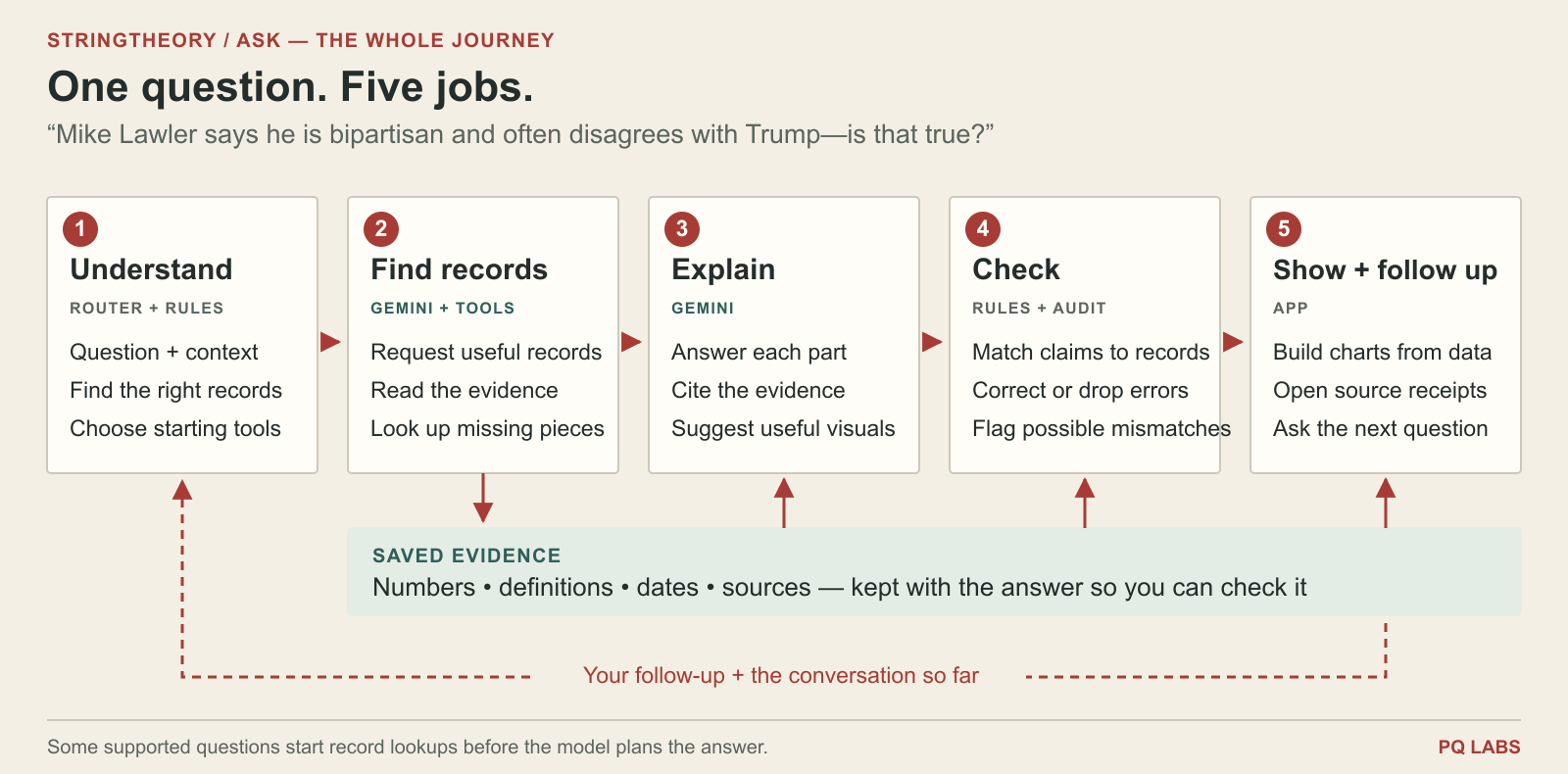
One question, five jobs. The same evidence stays attached as the answer takes shape. Tap a diagram to enlarge it.
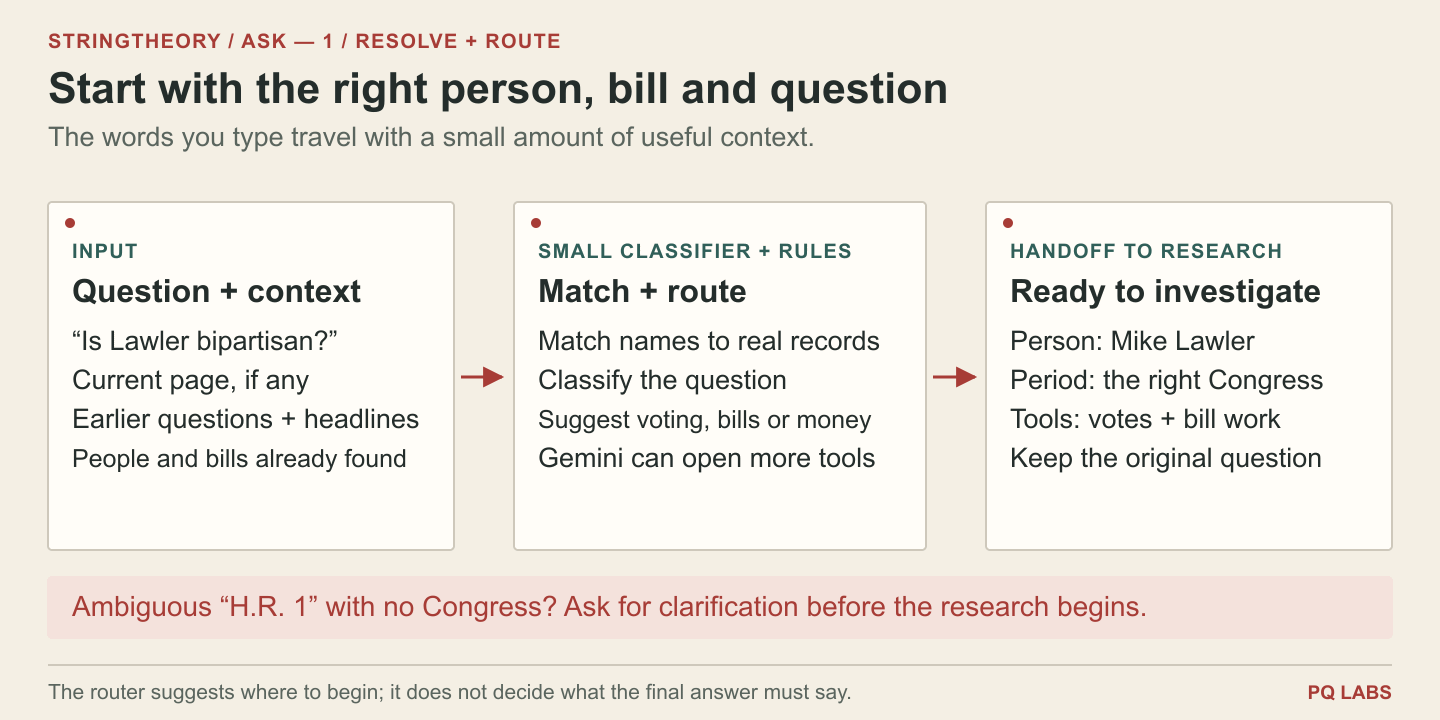
1. Work out what you’re asking
If you ask “What about his veto votes?”, “his” should still mean Lawler. Ask carries along the page you came from, recent questions, and the people or bills already identified.
Name matching connects the question to the right people and bill records. Then a small routing classifier—a natural-language processing (NLP) model trained using an encoder from the ModernBERT family—predicts the kind of research needed. This is text classification: question + context in; a suggested route and starting tools out.
“How did Lawler vote?” points toward voting records. “Who funds him?” points toward campaign finance. The live app uses a compact exported classifier for that first decision; Gemini can widen the research from there. An ambiguous bill number can trigger a clarification.
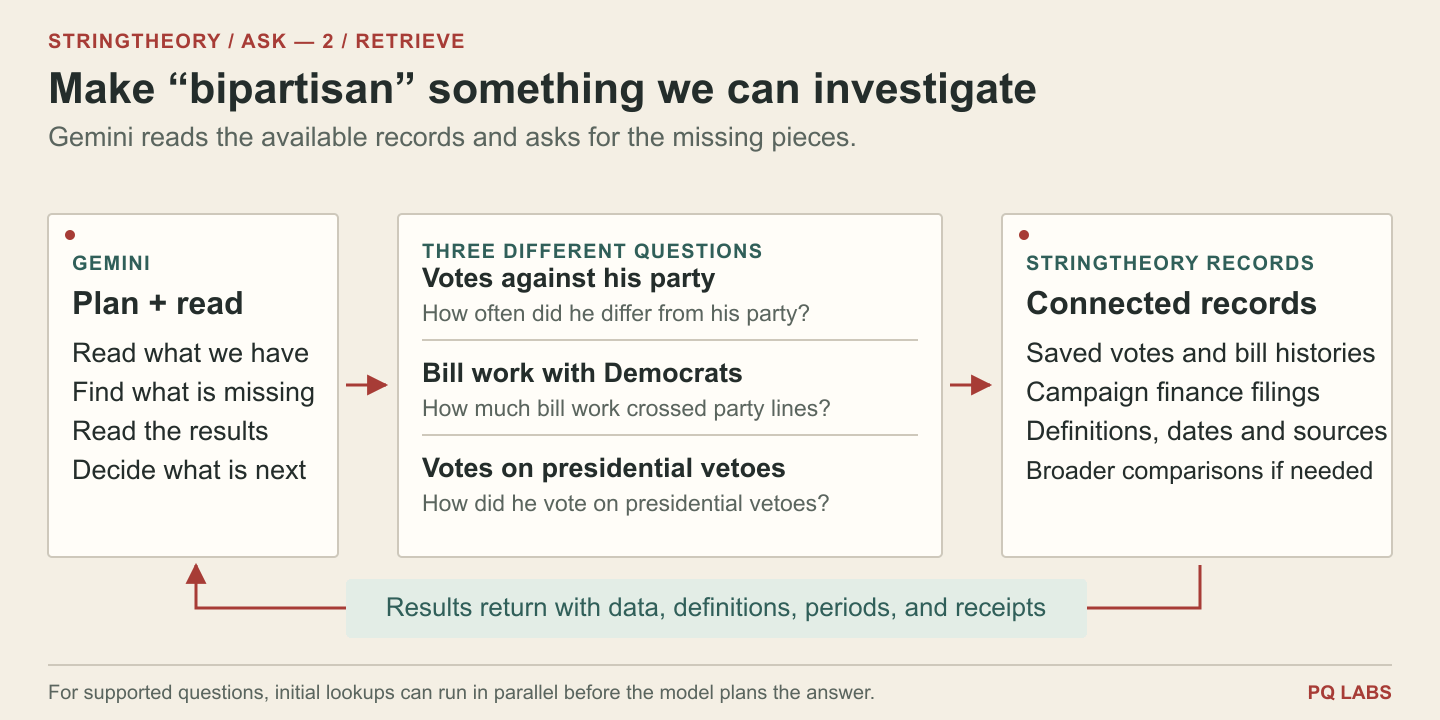
2. Find the records that can answer it
For Lawler, Ask needs evidence for each part of the claim: how he votes relative to House Republicans, whether he works with Democrats on bills, and how he voted on presidential vetoes.
Gemini 4 Argon, the current research and writing model, reads the available results and requests missing evidence through defined research tools. Those tools return numbers together with what they measure, the period covered, and their sources.
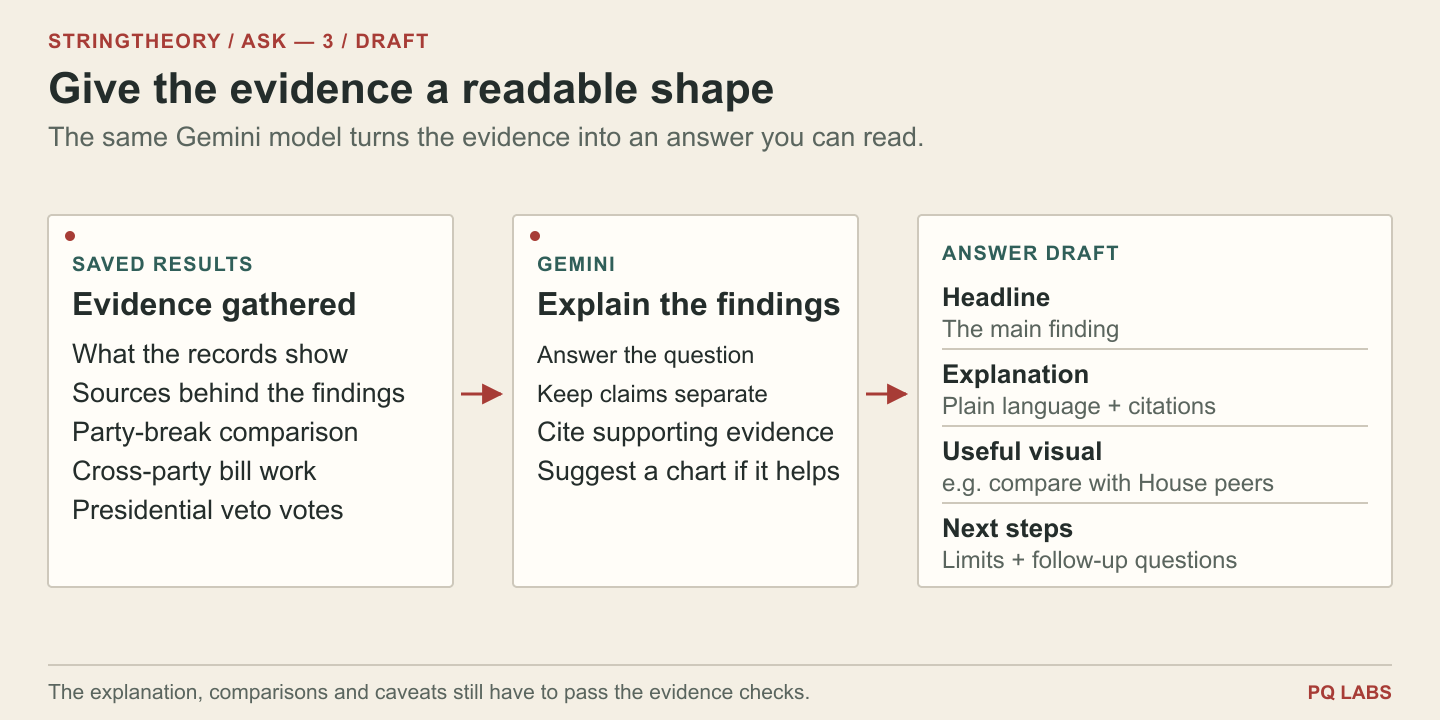
3. Turn the evidence into an explanation
The same model drafts an answer using those results, with references back to the evidence. It can also suggest a comparison, a timeline, or a useful follow-up.
The distinction matters here: Lawler can break with House Republicans more often than his peers while still voting with them most of the time. That also doesn’t tell us how often he disagrees with Trump. A single “yes, bipartisan” would skip the useful part.
4. Check what the answer actually claims
In this snapshot, Lawler voted against his party’s majority on 52 of 661 bill and resolution votes: 7.9%. That number needs its definition and time period. It measures party breaks in the 119th Congress, not disagreement with Trump.
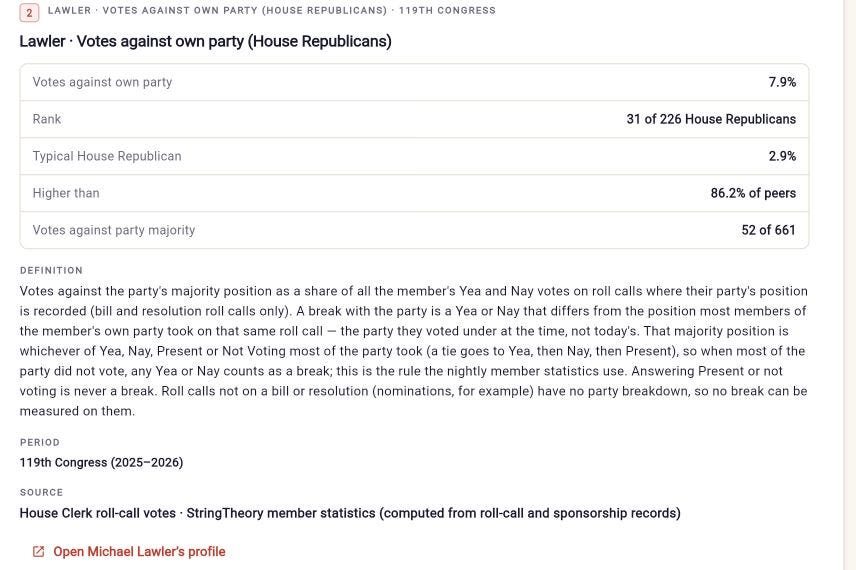
Open a receipt to see the count, definition, period, and source. Screenshot: October 21, 2026.
Rule-based checks compare the draft with the retrieved records and correct or remove unsupported claims.
The claim-verification model is another small NLP classifier from the same ModernBERT family as the router, trained for a different job: draft sentence + cited evidence → support verdict and possible mismatch flags. It also gets the original question for context.
A sentence can quote “52 of 661” correctly but attach it to the wrong Congress. That is the kind of mismatch it is trained to flag. Its verdicts are logged for audit; the rule-based checks decide which claims reach the finished answer.
Ask still makes mistakes. The point is to give you something you can check, and give me specific failures to fix.
5. See the answer. Keep the thread.
The app turns the retrieved records into interactive charts and comparisons, with receipts you can open. You can also click into the people and bills behind the answer.
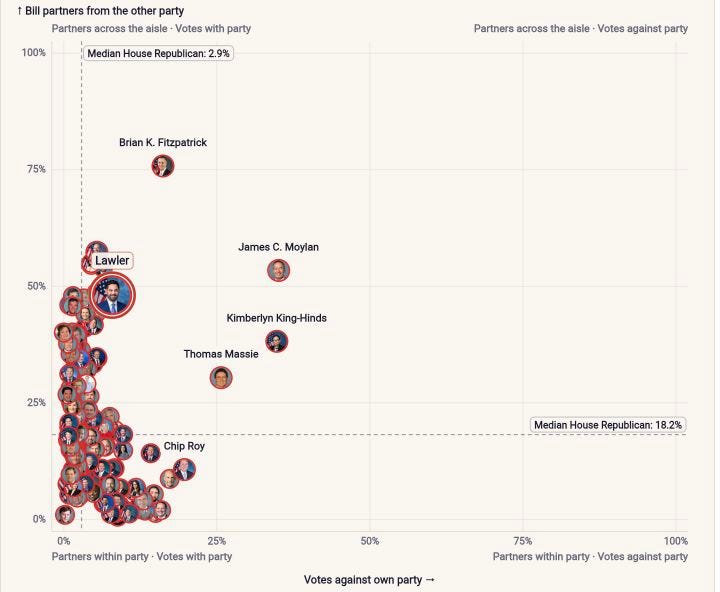
Lawler is ringed in red. Across: votes against his party. Up: bill partners from the other party. Two different measures, shown together.
That is the practical side of generative UI: the question helps shape the answer you see. A comparison should look different from a bill’s timeline.
Then comes the natural follow-up: “Which votes were those?” Ask carries the conversation forward and retrieves evidence again. You can keep pulling on the thread.
Tell me what worked. Or what didn’t.
If you try Ask, please use Was this useful? underneath the answer. Tap thumbs up when it helps, or thumbs down if it gets a fact wrong, misses the point, or is hard to follow.
Flag something lets you point to the exact receipt or chart that looks wrong. You can also add a note about what you were hoping to learn.
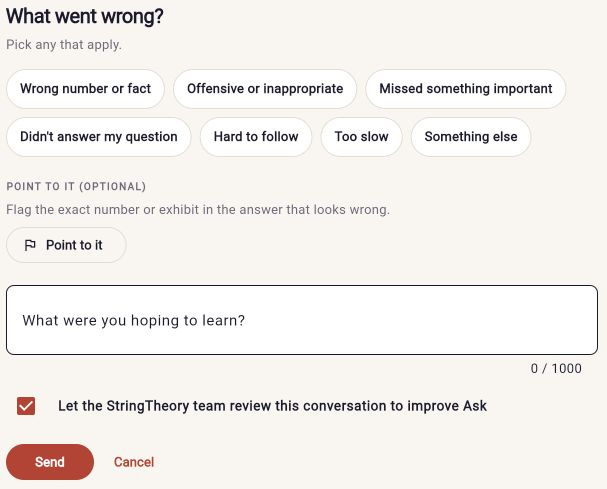
Tell me what went wrong, flag the evidence, and choose whether to allow conversation review.
If you allow conversation review, a thumbs-down or flagged answer comes to me with its question and evidence. I can turn those failures into test questions for future versions. Your feedback helps me decide what to fix next—and make Ask more useful, faster.
Where I want this to go
The bigger vision is a research workspace. I want journalists, policy people, and anyone digging into an issue to compare arguments against actual bill text, explore policy options, and turn that research into something useful: a brief, a chart, an article, or draft legislative language. Ask is the starting point. I want you to be able to do something actionable with the answer.
This is still in beta. I’m working on more reliable answers, shorter waits, and a clearer experience. Your questions and feedback help shape what it becomes.
In the upcoming ML series, I’ll go deeper on the pieces we only touched here: how I train the routing system, how the agent decides what to look up, and how we check claims against the receipts. We’ll get into the models, training data, and tests behind each step—including the failures that signal areas to improve and continue researching.
For now, bring a question about your representative, a bill in the news, or who funds a campaign. Ask it the way you would ask another person. Then open a receipt and see where it takes you.
More content and updates leading into the Midterms in 2 weeks.
Stay warm, basketball is back 🏀
— Pravin
Explore StringTheory: Web app · Android app
Big fan of Ask so far. There are some fetching and latency things that seem easily fixable to provide the answer faster but I'm not aware of any other sources that have all of this data readily available outside of StringTheory so I'll be asking away.